Skip to content
Gardenly3D

Customer Goals & Requirements

Start with clear customer goals and requirements

Capture what the customer wants the garden to achieve, connect those priorities to the drawing and keep them visible as the same project develops.

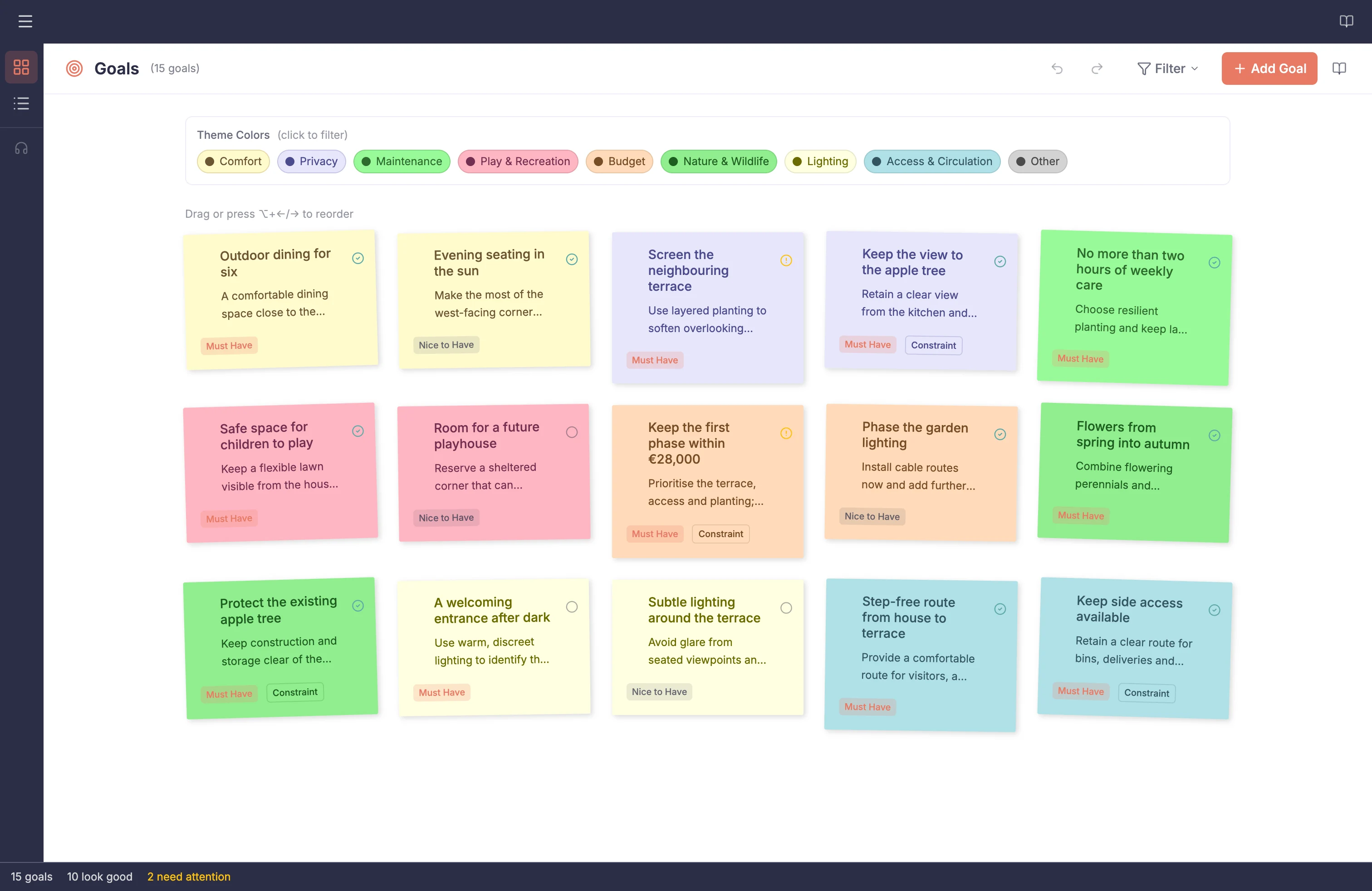
A realistic client brief organised as goals and constraints for Willow House Garden

Customer priorities connected to design

Keep customer goals visible while the design changes

Record what the garden should achieve and what the design must respect. Organise each goal by priority and review status, connect it to relevant drawing objects, and return to it throughout the project.

  1. 01

    Capture the intent

    Record goals, requirements, priorities and the reasons behind the garden project.

  2. 02

    Connect the drawing

    Link supported goals to the drawing objects intended to address them.

  3. 03

    Review as work develops

    Return from a drawing object to its related goal and update the review state.

  4. 04

    Carry the goals forward

    Include current customer goals in supported reports and later design discussions.

Professional garden design

Why define goals and requirements?

Keep customer goals and requirements useful from the first conversation through design review.

Clear direction

Turn customer conversations into structured goals and requirements

Client conversations often mix desired outcomes, fixed constraints and optional ideas. Notes collected across calls, messages and meetings can make it difficult to distinguish a central requirement from an idea that is still open for discussion.

Record goals and constraints as structured project information, then organise them by theme and importance. Add supporting context and begin from an editable template where useful, so customer priorities remain practical once drawing work starts rather than becoming notes that are rarely reopened.

In practice

  • Separate desired outcomes from conditions to respect
  • Mark must-have and nice-to-have priorities
  • Start from a template or record the goals directly

Design connection

Keep priorities close to the objects they affect

Customer goals can become detached from the drawing when they live in separate notes or documents. The connection is especially easy to lose when one requirement affects a particular boundary, planting area, path or structure rather than the garden as a whole.

Link a goal to relevant drawing objects and move in either direction between the recorded requirement and the drawing when reviewing the design. This gives the designer a direct route from the customer's stated intention to the part of the design intended to address it, without claiming that the link itself proves the goal has been satisfied.

In practice

  • Link goals and drawing objects
  • Show linked goals while working in the drawing
  • Return from an object to its related goal

Review

Make design review more deliberate

A goal may be recorded early but never revisited as the design changes. Without a visible review state, an unresolved question can look the same as a requirement that has already been considered and accepted.

Use review states, list and post-it views, and filters to revisit priorities throughout the project. Mark what looks good or needs attention, focus on a theme or importance level, and include the recorded goals in supported reports when customer requirements need to accompany project material.

In practice

  • Mark goals as not reviewed, looks good or needs attention
  • Switch between list and post-it views
  • Include project goals in supported reports

Capability detail

Goals and requirements capabilities

Capture goals and requirements

Record what the client wants, what limits the design and which priorities matter most before developing the garden design.

Goals

Record the outcomes and qualities the finished garden should achieve.

Constraints

Record existing conditions, limitations and requirements the garden design must respect.

Nine garden themes

Organise goals under comfort, privacy, maintenance, play, budget, nature, lighting, access or other.

Must-have and nice-to-have

Distinguish non-negotiable requirements from desirable additions that can be reconsidered.

Notes and context

Add supporting notes to preserve the reasoning or detail behind each goal.

Review status

Mark each goal as Not reviewed, Looks good or Needs attention as you assess how well the design meets the clientโ€™s brief.

Organise and review

Review the brief in the format that suits the conversation, and filter the recorded requirements to focus on the relevant detail.

Post-it board

Review theme-coloured goal cards in a visual board and reorder them when filters are clear.

List view

Scan goal status, title, theme, importance and linked-object count in a structured list.

Filters

Focus the board or list by theme, importance or review status, then clear active filters together.

Start with a template

Use a relevant starting set of requirements to prompt the client discussion, then adapt it to the individual garden project.

Family Garden

Start with editable goals for safe play, outdoor dining, storage and family-friendly planting.

Low Maintenance

Start with editable goals for manageable upkeep, water use and practical garden care.

Social Garden

Start with editable goals for entertaining, privacy, seating and evening use.

Connect goals to the project

Link recorded goals to relevant drawing objects and include the brief in project reporting to keep the design intent visible.

Continue exploring Gardenly3D